Introduction
Background tasks are essential for modern web applications, allowing you to handle time-consuming operations like sending emails, processing images, or generating reports without blocking user requests.
This guide explores Django's new built-in task system introduced in Django 6, demonstrates how to use the django-tasks package for production-ready background processing, some tips for poeple who are new to background tasks in Django, and compares it with Celery to help you choose the right solution for your project.
Django Design Philosophy
+----------------------+
|  BaseTaskBackend     |   (abstract class)
+----------------------+
| + __init__(...)      |
| + validate_task(...) |
| + enqueue(...)       | [abstract]
| + aenqueue(...)      |
| + get_result(...)    |
| + aget_result(...)   |
| + check(...)         |
+----------------------+
          ^
          |
+----------------------+
|  CustomBackend       |  (concrete class)
+----------------------+
| + enqueue(...)       | [implemented]
|   ...                | [other overrides possible]
+----------------------+
Notes:
- For now, Django 6 only contains some reference code, which can not be used in real projects (missing useful backend).
BaseTaskBackendis an abstract base class that defines the interface and common functionality for task backends in Django.- Developer can create new subclasses of
BaseTaskBackendto implement custom backend logic to fit their needs.
You can check the task backend source code here https://github.com/django/django/blob/36b5f39d9372147f0e758f590e35ee2b2bc317dd/django/tasks/backends/base.py
Some important methods:
enqueue: Abstract method for scheduling a task—must be implemented by subclasses.aenqueue: Async wrapper aroundenqueue.get_result: Placeholder for retrieving a task result; unimplemented unless backend supports it.aget_result: Async wrapper aroundget_result.
Install Django-Tasks
django-tasks is a lightweight, standardized API for handling background work in Django. Originally an independent package, it served as the basis for the native Tasks framework introduced in Django 6.0
$ pip install django-tasksAdd to INSTALLED_APPS in your settings.py:
INSTALLED_APPS = [
    'django_tasks',                   # new
    'django_tasks.backends.database'  # new
]
Config TASKS in your settings.py:
TASKS = {
    'default': {
        'BACKEND': 'django_tasks.backends.database.DatabaseBackend',
    },
}
Next, run migrations to create necessary database tables:
$ python manage.py migrateNow Django-Tasks is set up with the database backend.
Usage Example
Create tasks.py in your Django app:
from django_tasks import task
import time


@task
def greet_user(name):
    """Simple task that creates a greeting"""
    time.sleep(0.5)  # Brief delay
    return f"Hello, {name}! Task completed successfully."
Let's enqueue it in Django shell
$ python manage.py shell

>>> from worker_test.tasks import greet_user
>>> task = greet_user.enqueue(name='michaelyin')
>>> task.status
TaskResultStatus.READY
>>> task.id
'3a8b6706-abfc-4333-971a-8cf502d6db19'
Notes:
- The
enqueuemethod schedules the task for execution. - The returned
taskobject contains the task's status and result. - Each task has a unique
idfor tracking.
Let's launch the worker to process the task in another terminal:
$ python manage.py db_worker

Starting worker worker_id=Ebcpz10WmTAw85E9NuDzJ1BrWFoJDwOC queues=default
Task id=3a8b6706-abfc-4333-971a-8cf502d6db19 path=worker_test.tasks.greet_user state=RUNNING
Task id=3a8b6706-abfc-4333-971a-8cf502d6db19 path=worker_test.tasks.greet_user state=SUCCEEDED
Let's keep checking the result in the previous Django shell:
>>> task.status
TaskResultStatus.READY

>>> task.refresh()
>>> task.status
TaskResultStatus.SUCCEEDED

>>> task.return_value
'Hello, michaelyin! Task completed successfully.'
Notes:
- Here we use
task.refresh()to update the result status from the database. - Once the worker processes the task, the status changes to
SUCCEEDED, and we can access thereturn_valueif we need.
Django Admin
You can also check the tasks in Django Admin interface:
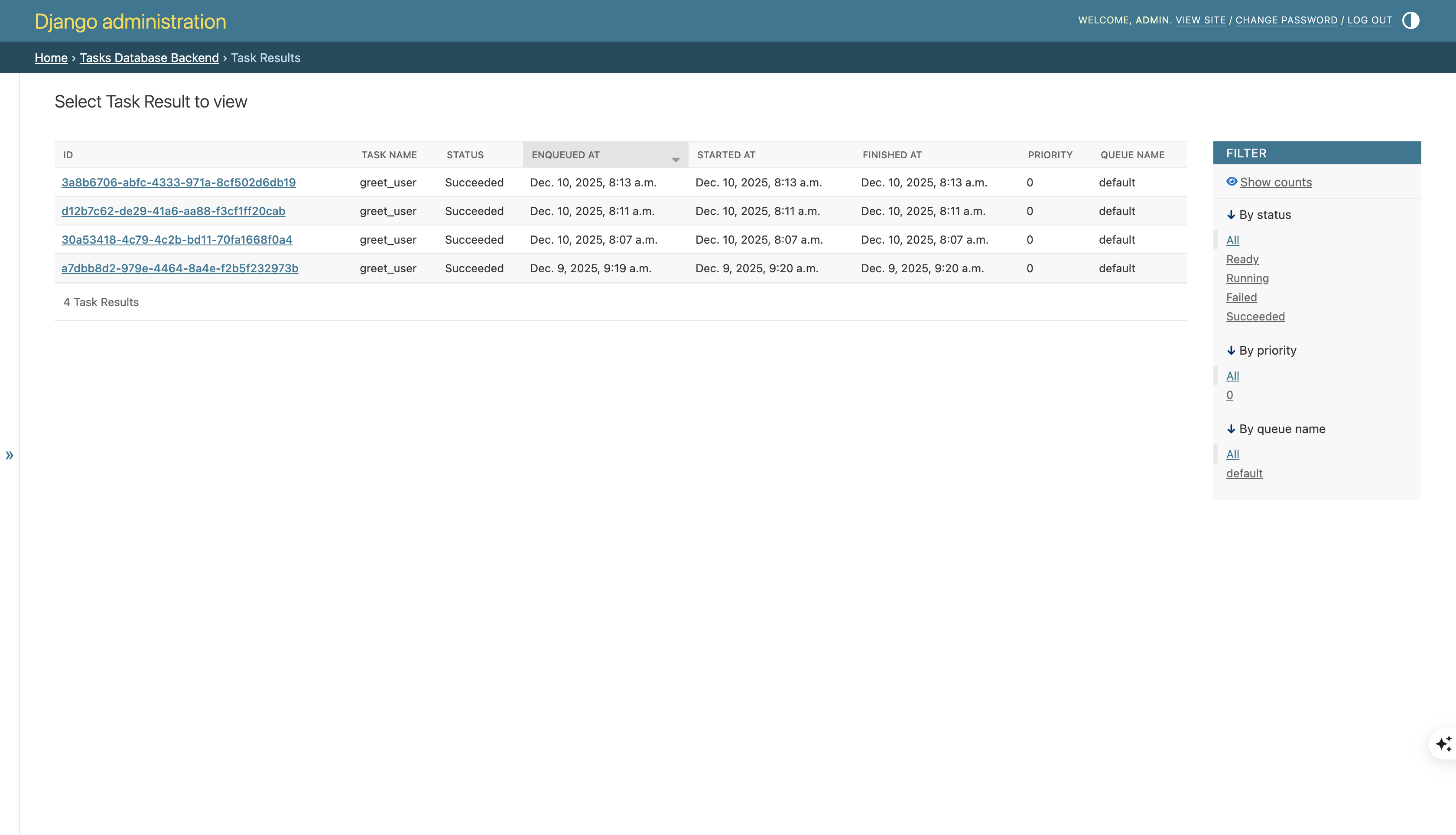
Queue
The django-tassks also supports queue, you can set queue_name in the task decorator and then use --queue-name when launching db_worker
Tips
For people who are new to background tasks, below are some tips
Tip 1: Pass a reference (ID)
@task
def expand_abbreviations(article):
    article.body.replace('MyCorp', 'My Corporation')
    article.save()
Here's the problem: imagine the task queue is busy, so your task has to wait for a while before it runs. While it's waiting, another author edits that same article and saves their changes. When your task finally runs, it overwrites the new version with the old version - because your task was holding onto the original article data the whole time.
@task
def expand_abbreviations(article_id):
    article = Article.objects.get(id=article_id)
    article.body.replace('MyCorp', 'My Corporation')
    article.save()
Fixing the race condition is easy, just use the article id instead, and re-fetch the article in the task body
Tip 2 transaction.on_commit:
@transaction.atomic
def simple_view(request):
    username = random_username()
    user = User.objects.create_user(username, '[email protected]', 'johnpassword')
    task_send_welcome_email.enqueue(user_pk=user.pk)

    time.sleep(1)
    return HttpResponse('test')
Notes:
- When
task_send_welcome_email.enqueueis called, the user creation transaction may not have been committed to the db yet. - If the task runs before the db transaction is committed, it may not find the user in the database, leading to errors like
DoesNotExist exception
from functools import partial

@transaction.atomic
def simple_view(request):
    username = random_username()
    user = User.objects.create_user(username, '[email protected]', 'johnpassword')
    transaction.on_commit(partial(task_send_welcome_email.enqueue, user_pk=user.pk))

    time.sleep(1)
return HttpResponse('test')- To fix the issue, you can use
transaction.on_committo ensure the task is only enqueued after the transaction is successfully committed - Use
functools.partialis to fix a common logic error caused by how Python handles closures and late binding in loops, many people meet this weird bug before. - More details can be found here https://docs.djangoproject.com/en/6.0/topics/tasks/#transactions
Django-Tasks VS Celery
| Feature | Django-Tasks | Celery |
|---|---|---|
| Ease of Use | ⭐⭐⭐⭐⭐ Very simple - just install, configure, and run. Built into Django 6+ with minimal setup required. | ⭐⭐⭐ More complex setup - requires broker configuration, worker setup, and additional settings. |
| Supported Brokers | Database (built-in), Redis (via third-party backends) | Redis, RabbitMQ, SQS, Kafka, and many more message brokers |
| Flexible Routing | ⭐⭐ Basic routing via queue names and worker configuration | ⭐⭐⭐⭐⭐ Advanced routing with complex routing rules, priority queues, and task routing based on task attributes |
| Periodic Job | django-crontask (cron syntax via APScheduler) | Celery Beat (built-in scheduler) |
| Task Retries | Not supported yet | ⭐⭐⭐⭐⭐ Advanced retry options with exponential backoff, max retries, and custom retry conditions |
| Task Chains | Not supported | ⭐⭐⭐⭐⭐ Supports complex workflows: chains, chords, groups, and callbacks |
| Monitoring | Django Admin interface | ⭐⭐⭐⭐⭐ Flower (real-time monitoring), Sentry integration, custom monitoring tools |
| Task Priorities | Limited (via queue separation) | ⭐⭐⭐⭐ Full priority queue support |
| Result Backend | Database (built-in), Redis via django-rq | Multiple options: Redis, Database, Memcached, and more |
| Dependencies | Minimal - Django and database | Requires broker (Redis/RabbitMQ) and result backend |
| Performance | Good for low-to-medium workload | ⭐⭐⭐⭐⭐ Optimized for high-throughput, distributed processing |
| Community & Maturity | New (Django 6, 2025) | ⭐⭐⭐⭐⭐ Very mature (since 2009), large community, extensive documentation |
| Django Integration | ⭐⭐⭐⭐⭐ Native Django integration - feels like part of Django | ⭐⭐⭐⭐ Requires additional libraries (django-celery) for full integration |
When to Choose Django-Tasks
- You're new to background tasks - Simple setup and intuitive API
- Simple use cases - Basic task execution without complex workflows
- Minimal infrastructure - Don't want to maintain Redis/RabbitMQ
- Django-centric application - Want everything integrated with Django
- Low-to-medium workload - Don't need distributed task processing
When to Choose Celery
- Complex task workflows - Need chains, chords, or group tasks
- High-throughput requirements - Need to process thousands of tasks per minute
- Advanced scheduling - Need periodic tasks with complex schedules
- Advanced routing - Need to route tasks to specific workers based on task attributes
- Production monitoring - Need real-time monitoring and alerting
Recommendation:
- Start with Django-Tasks if you're new to background tasks or have straightforward requirements.
- You can always migrate to Celery later as your application's complexity grows. The task decorator syntax is similar, so migration is relatively straightforward.
Alternative
- Steady Queue brings Rails' proven Solid Queue architecture to Django as a pure database backend. It features built-in Cron job support and is compatible with the Django tasks interface.
Conclusion
Django 6's built-in task system provides a clean foundation for background processing, while django-tasks offers a production-ready implementation that's significantly simpler than Celery for most use cases.
Start with django-tasks if you're new to background tasks or have simple requirements.
Consider Celery when you need advanced features like complex task workflows (chains, chords), high-throughput distributed processing, or sophisticated monitoring with Flower.
Remember that you can always migrate from django-tasks to Celery as your application's complexity grows—the similar task decorator syntax makes the transition relatively straightforward.